Daily Withdrawals in the FxVerify Dashboard




The FxVerify dashboard now includes Daily Withdrawals (in self-service mode), allowing users to submit withdrawal requests directly from their dashboard.
This feature works alongside the existing Automatic Payout Monthly Cashback system and gives users more flexibility in how, when and where they may receive their funds.
What's New in the Dashboard?
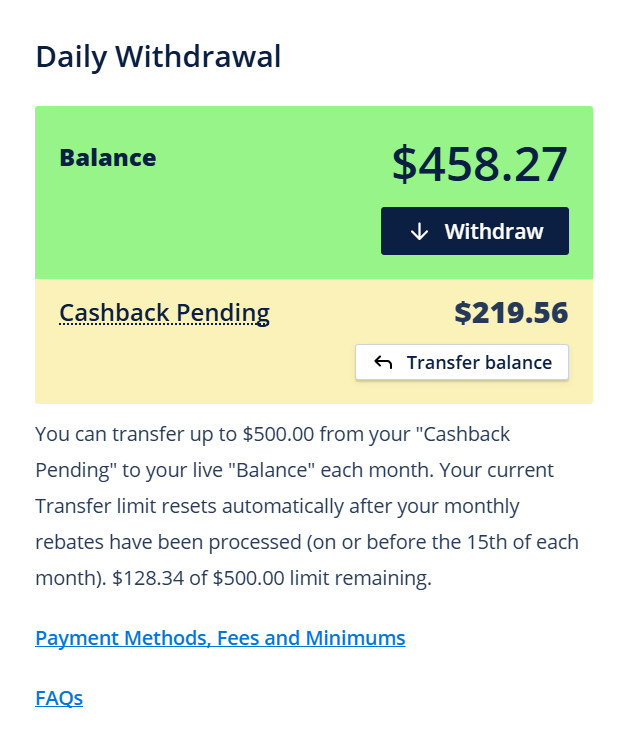
Daily Withdrawals
Users can now submit a withdrawal request for any part of their Balance directly from the dashboard.
- No support ticket is required to submit a request
- Withdrawals are initiated by the user
- This feature exists in addition to Automatic Payout Monthly Cashback
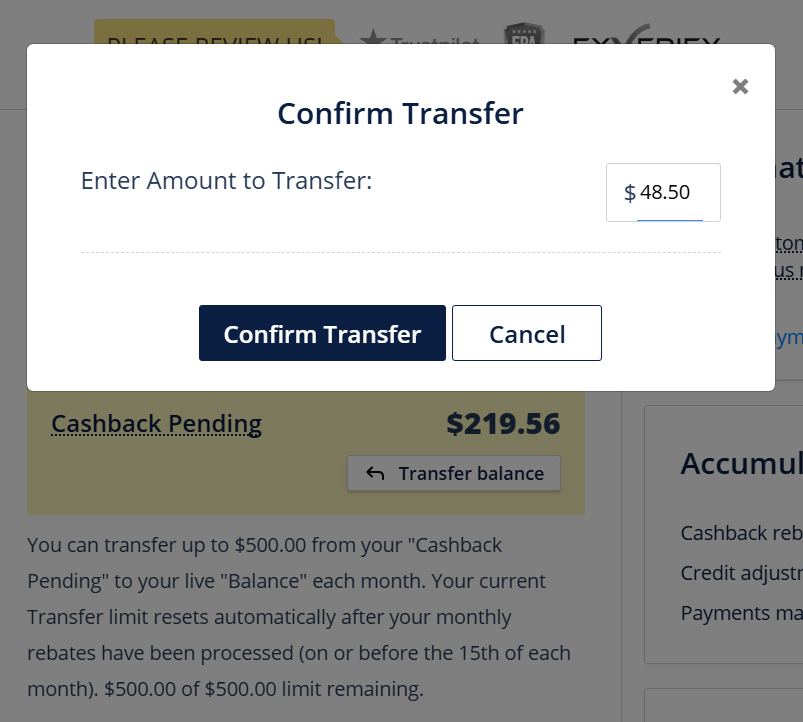
Cashback Pending Transfers
Users may transfer funds from Cashback Pending to Balance, up to a designated monthly limit.
- Current transfer limit: $500.00 per month
- The current Transfer limit resets automatically after the monthly cashback rebates have been credited (on or before the 15th of each month) to your “Cashback Pending”
- Cashback Pending funds may only be withdrawn via the Daily Withdrawal by first transferring them to the Balance
Definitions of Terms
Balance
Balance refers to funds that are:
- Available for withdrawal
- Withdrawable using the Withdraw button
If the Withdraw button is visible and active, you can submit a withdrawal request.
Cashback Pending
Cashback Pending is an estimate of rebates earned but not yet paid for designated brokers where accounts have been verified with the rebate method of “Monthly Cashback – Real Time Reports”.
- These funds cannot be withdrawn directly
- They must first be transferred to Balance
- Transfers are subject to the monthly limit
Current Transfer Limit — What It Applies To
- The current Transfer Limit applies to transfers from Cashback Pending to Balance
- The current Transfer Limit is $500
- Once the current Transfer Limit is reached, further transfers are disabled until the next reset on or before the 15th of each month
Step-by-Step: How to Make a Daily Withdrawal
Transfer funds (if available and if required)
If your funds are in Cashback Pending:
- Click Transfer balance
- Enter the amount (up to your remaining current Transfer Limit)
- Confirm
Submit the withdrawal
- Click Withdraw
- Enter the amount
- Select your desired payment method
- Confirm the withdrawal
Email Verification (2FA)
For security reasons, withdrawals require email verification:
- A verification code is sent to your registered email address
- Enter the code in the dashboard
- Confirm
You will see an on-screen confirmation once the withdrawal is submitted.
What Happens to a Withdrawal Request After Confirmation?
- Your withdrawal is added to the processing queue
- Withdrawals entered by 00:00 AM EST will be processed by 11:00 AM EST Monday – Friday
- You can view the withdrawal request under Activity
- The Withdrawal Request may be cancelled if it has not yet been processed
Cancelling a Withdrawal
- Go to Activity
- Open the withdrawal request
- Click Cancel, if available
Cancelled withdrawals return to your Balance.
When You Cannot Withdraw (Common Questions)
You may not be able to withdraw if:
- There are no funds in Cashback Pending
- You have reached the current Transfer Limit
- Automatic Monthly Payouts are processing
In these cases, the dashboard will prevent the action or disable the button.
Payment Methods
Only selected payment methods are available for withdrawals. In the dashboard, after clicking Withdraw, you can view:
- Supported payment methods (only those shown may be used)
- Withdrawal limits
- Fees (if applicable)
Automatic Monthly Payouts (Monthly Cashback)
Automatic Monthly Payouts are part of the Monthly Cashback system and are separate from Daily Withdrawals.
- Automatic Monthly Payouts are processed if profile balance exceeds the minimum payout threshold set by client and payment method has been verified (2FA).
- Users may use Automatic Monthly Payouts, Daily Withdrawals, or both
Summary
- You can submit withdrawal requests directly from the dashboard
- Withdrawals require email verification (2FA)
- Withdrawals entered by 00:00 AM EST will be processed by 11:00 AM EST Monday – Friday
- There is a current Transfer Limit of $500 per month
- The current Transfer Limit resets automatically after your monthly rebates have been processed on or before the 15th of each month
- Automatic Monthly Payouts remain available as a separate functioning system

 Copy Link
 Share on Facebook
 Share on X
 Share by Email